What I Learned at the Docling Workshop at SCaLE 23x
Most people building RAG pipelines treat document ingestion as the boring part. Load the PDF, split it into chunks, embed them, move on. The quality of what you extract rarely gets much attention until the retrieval starts returning garbage.
The Docling workshop at SCaLE 23x was entirely about that problem. The IBM Granite team spent a full session on what actually happens when you convert a document into something a model can use, and it was more interesting than I expected.
What Docling is doing
Docling is a document processing library, not a model. Its job is to take a raw input (PDF, DOCX, image, scanned page) and produce structured output that downstream systems can actually work with. JSON, Markdown, HTML. The same interface regardless of what went in.
The reason that matters: raw document text is not the same as structured document content. A PDF has a reading order that isn't encoded in the byte stream. Tables have structure that flattens into noise when you pull the text directly. Code blocks and formulas lose meaning without context. Docling recovers all of that before anything else in the pipeline touches the content.
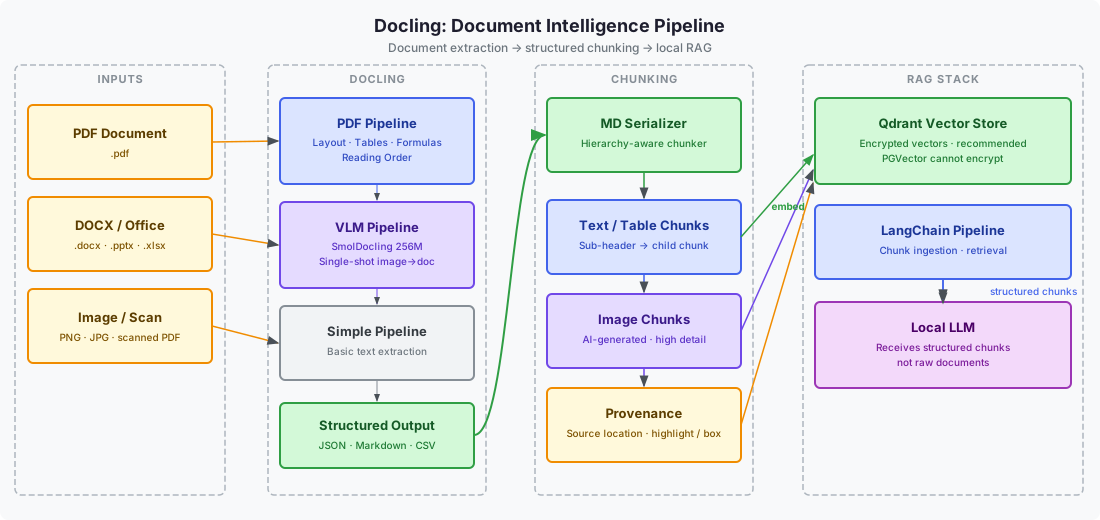
There are three pipelines. The Simple Pipeline handles basic extraction. The PDF Pipeline goes deeper, recovering page layout, reading order, table structure, code blocks, and formulas from complex documents. The VLM Pipeline handles images and scanned pages using a visual language model to convert a photo of a page into a structured Docling document in a single pass. The lightweight model for that is SmolDocling at 256M parameters. Granite VLM is the larger option.
One limitation came up immediately: Docling does not handle handwriting. If the input is typed and printed, it works well. If it's handwritten notes, you need something else.
How chunking actually works for RAG
The chunking step is where Docling's structure pays off. The chunker walks the document hierarchy rather than just splitting on character count or token limit. It follows the heading structure, treats each sub-header and its content as a logical chunk, and uses a Markdown serializer to produce the chunk text. The output is semantically coherent pieces rather than arbitrary text windows.
After chunking, you get two types: text and table chunks from the document content, and image chunks for any figures. The image chunks are AI-generated descriptions at high detail. Every chunk carries a reference back to its exact location in the source document. That provenance is what lets you highlight or box the original passage in an interface when you surface a retrieval result. It's the difference between returning an answer and returning an answer with a citation that points somewhere real.
The chunks move into a LangChain-based RAG pipeline from there. The workshop used Qdrant as the vector store. One detail worth noting: PGVector, the popular PostgreSQL-based option, cannot encrypt stored vectors. If that matters for your use case, it's a disqualifying constraint.
The cost argument for running it locally
The presenter showed benchmark numbers from the Fine PDFs dataset on HuggingFace. Docling ran 50 times more cost-effectively than the next alternative for PDF extraction at scale. That figure comes from a comparison against VLMs doing the same extraction work.
The practical implication for anyone running a local AI stack: send the extracted, structured output to your LLM, not the raw document. Document files are large. Feeding them directly to a cloud model is expensive in tokens. Running Docling locally to do the extraction first, then sending only the structured chunks, cuts that cost significantly. The workshop explicitly framed this as one of Docling's strongest use cases: run it as a local MCP tool or skill, keep the heavy extraction work on your hardware, use the model for what it's actually good at.
LM Studio has a one-click Docling integration if you want the simplest path to that setup.
Where it breaks down
Docling converts and extracts. That is the full scope of what it does. It has no concept of document state or updates. If a document changes, you re-run the pipeline. There is no webhook, no change detection, no way to diff one version against another. Someone in the workshop asked whether you could delete stale chunks when a document is reuploaded. The answer was technically yes, you can search by chunk and delete, but you have to build that logic yourself. Docling will not tell you something changed.
This isn't a criticism so much as a scope definition. It's a conversion and extraction tool, not a document management system. Understanding that boundary matters when you're deciding where to put it in a pipeline.
The mental model shift
Before this workshop I thought about RAG documents as text to ingest. The useful reframe is that a document is a structured artifact with hierarchy, layout, and provenance. Chunking is not splitting text into pieces. It's decomposing a structure into its logical units.
Once you think about it that way, the quality difference between a naive splitter and a structure-aware chunker becomes obvious. A naive splitter produces chunks that break mid-sentence, lose table context, and have no idea where they came from in the source. Docling's chunker produces chunks that map to how a human would actually read and reference the document.
That seems like a small distinction until you're debugging why your retrieval keeps returning incomplete answers.
Sources
- Docling project: https://github.com/docling-project/docling
- Docling MCP: https://github.com/docling-project/docling-mcp
- SmolDocling 256M (predecessor): https://huggingface.co/ds4sd/SmolDocling-256M-preview
- Granite-Docling 258M (successor): https://huggingface.co/ibm-granite/granite-docling-258M
- Fine PDFs dataset: https://huggingface.co/datasets/ds4sd/FinePDFs
- Workshop materials: https://ibm-granite-community.github.io/docling-workshop/
Related: Training a Small LLM · KwaaiNet: Distributed AI Inference · Why I Built a Personal Infrastructure Lab